Do I need to download an app?
Sansa Temple runs in a web browser. The basic entry process checked on October 31, 2026 did not require installing an app or creating an account. If you are looking for a Sansa Temple app, begin with the browser experience rather than assuming a separate mobile download is necessary.
This English guide explains the Korean labels seen during the check. It does not establish that the game itself has an English interface. Read the labels below alongside the buttons currently visible in your scene.
Entering the hall from the gate
- Choose Start exploring Sansa and wait for the 3D scene and connection.
- From the gate, face the central hall and follow the garden path.
- Near its doorway, choose
청연당 들어가기to enter Cheongyeondang. - Inside the hall, select the action you want to try.
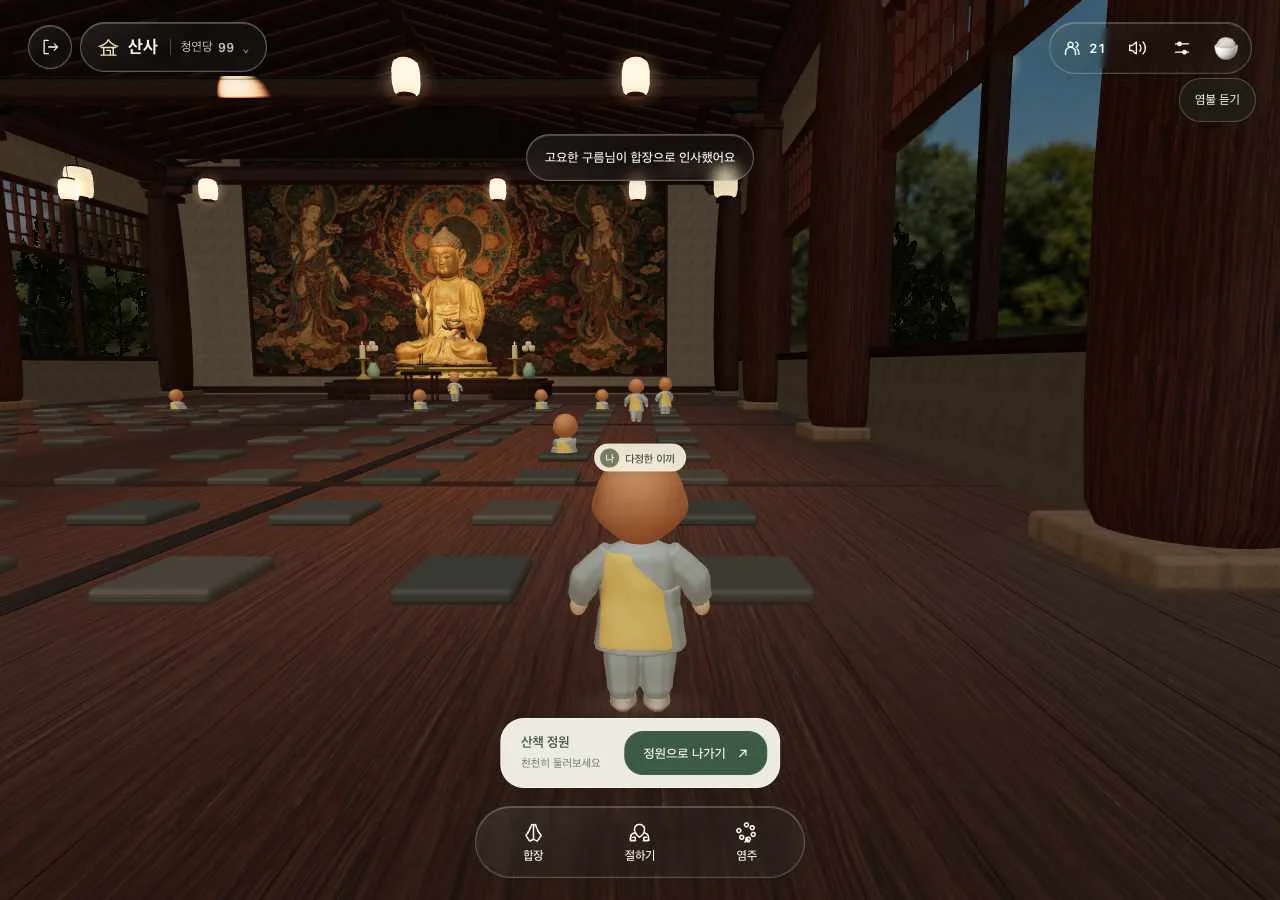
Simply walking into the door did not finish the scene transition in this check. To return to the garden, choose 정원으로 나가기 near the exit. If the camera has turned you around, use the garden and map guide to restore the gate-facing-hall reference direction.
Desktop and mobile controls
| Action | Desktop | Mobile touch simulation |
|---|---|---|
| Move | WASD; help also lists arrow keys | Tap the ground to select a destination |
| Look around | Drag the scene | Drag with one finger |
| Change viewing distance | Mouse wheel | Pinch with two fingers |
| Bow or stop | Number 1 | The on-screen action button |
| Open prayer beads | Number 2 | 염주 |
| Join palms | Number 3 | 합장 |
WASD was tested directly. Arrow-key walking comes from the help panel. Touch input was checked at a 390×844 viewport with simulated touch, including two-point gestures. It was not a test of every physical iPhone or Android device.
On mobile, try a nearby clear destination, wait for the character to stop and then rotate the camera. Choosing a distant destination beyond several obstacles can make the route harder to understand.
Korean buttons and their meanings
| Label | Meaning and use |
|---|---|
청연당 들어가기 |
Enter Cheongyeondang, the central hall. |
정원으로 나가기 |
Return to the garden. |
절하기 |
Begin bowing; the character can find an empty cushion. |
멈추기 |
Stop; the surrounding scene tells you which action is stopping. |
멈추는 중 |
Stopping in progress; allow the current movement to finish. |
합장 |
Join palms in greeting. |
염주 |
Open the prayer-bead screen. |
다시 머무르기 |
Enter again after leaving; this restarted the visit in the check. |
Why does bowing make the character walk?
In the Sansa Temple hall, requesting a bow made the character find an empty cushion, walk to it and begin repeated bows. Selecting each cushion manually was unnecessary. A request made in the garden could move the character toward the hall, but that did not show that the hall entrance button would also be activated automatically.
To stop bowing, select the action again or press 1. When the interface says stopping is in progress, wait rather than repeatedly toggling it. Requesting a palm greeting during bowing also produced a notice to wait until a bow finished.
Palm greetings, beads and courtyard shortcuts
Joining palms produces a gesture and greeting notice. No text or voice-chat input was found in the ordinary interface. It is a way to greet through movement, rather than a way to type a message.
Prayer beads have their own screen and counter. The 108 prayer beads guide explains why one round is different from a task to complete 108 bows. No such reward task was verified.
Inside Moonlight Courtyard, number 1 changes to dancing. Check your current location before treating a keyboard shortcut as having the same meaning everywhere.
When an action seems unresponsive
- At a doorway, look for a scene-transition button.
- During a bow, check whether the current movement is still finishing.
- On an obstructed path, select nearby clear ground or another route.
- For a full room, inspect the room list rather than treating it as a browser failure.
Automatic queue order, admission times and every disconnection scenario were not verified. Sources and checks explains the conditions and limits behind these instructions.